OpenWRT denies access to my vault
Preface
I wanted to have a more professional passwordmanager, so me and my family can have our own passwords and shared ones. So I decided to install a vaultwarden instance to my proxmox server. Thanks to proxmox ve helper scripts it was the easiest thing to do so and instantly usable. The problem: only from browser because it did not have a proper certificate for the android app
Requirement
I wanted to use the android app because we do most stuff with our mobile phone. But the app did not accept the certificate and as vaultwarden needs to have a secured connection, I was not able to simply use http. As we have a wireguard VPN to our homenetwork and I do not want to expose my vaultwarden to the internet, I had to find a solution in which I can get both: the trusted certificate and the local network only mode.
The solution
With help of some guys of a signal group, I got the solution, how to achieve this. 1. I need to use my already installed pihole to resolve the domain locally to my also already installed caddy server 2. I had to reverse proxy the domain to the vault server with help of caddy 3. I had to disable preinstalled certificates on vaultwarden 4. Solve my problem with openWRT (but I will reveal this later ;) )
The Guide
Now I will guide you a little bit (not too detailed, because this post should cover my original problem) on how to retrieve a trusted certificate from caddy for your domain even without exposing the vault to the internet.
Resolve dynds locally only to caddy
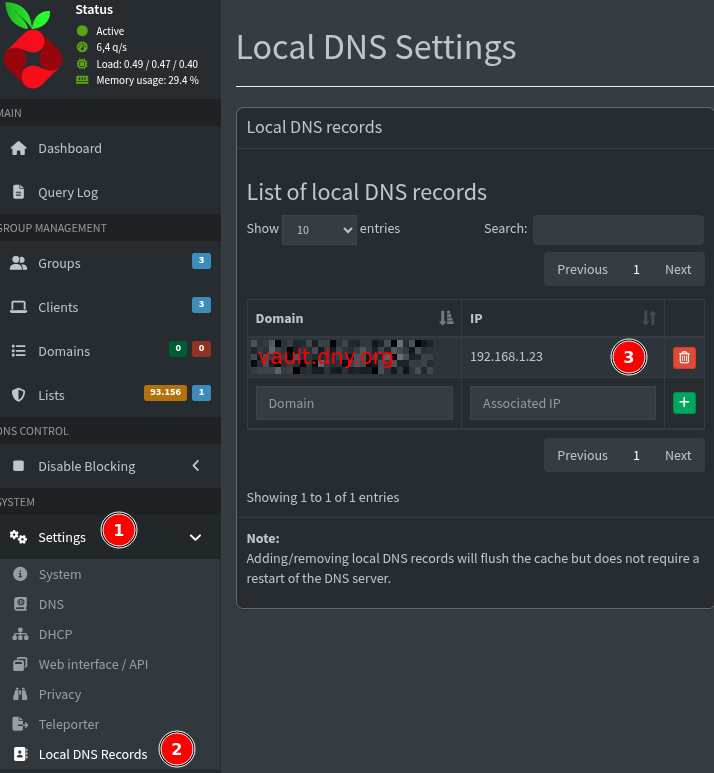
In order to resolve your DNS locally, you need to map the domain to your caddy server. You can do this by adding an entry to your resolve.conf on every device, or more globally on your router or if you have a separate DNS server like Pi-Hole, you can do it by adding a local DNS record this way:
Add reverse proxy to caddy
Now that your DNS points to your caddy server, you can add the reverse proxy entry to your caddy file, which redirects the request to your vaultwarden instance:
vault.dyn.org {
        reverse_proxy http://192.168.1.28:8000
        tls {
                dns desec {
                        token "deducted"
                }
                propagation_timeout 300s
                propagation_delay 120s
        }
}
Note that this is my configuration for desec.io. If you have another way to get a trusted certificate, you need to adjust the entry properly. I got two dynamic dns, so I have to add the tls entry to each domain, so I can separate them
Get rid of preinstalled vaultwarden certificates
To use the trusted certificates from caddy, you need to disable the preinstalled ones from ROCKET_TLS in vaultwarden. For that, you need to find the .env file (in my case it is in the first folder when accessing the instance via ssh) and edit it with the editor of your choice. Now you should find those three lines
ROCKET_TLS='{certs="/opt/vaultwarden/passwords.lan.cert.pem",key="/opt/vaultwarden/ca.key.pem"}'
ROCKET_TLS='{certs="/opt/vaultwarden/ca-chain.cert.pem", key="/opt/vaultwarden/intermediate.key"}'
DOMAIN=https://vault.local
and comment them
#ROCKET_TLS='{certs="/opt/vaultwarden/passwords.lan.cert.pem",key="/opt/vaultwarden/ca.key.pem"}'
#ROCKET_TLS='{certs="/opt/vaultwarden/ca-chain.cert.pem", key="/opt/vaultwarden/intermediate.key"}'
#DOMAIN=https://vault.local
The problem
After I did all this, I was not able to access my vaultwarden instance and I knew it had nothing to do with the certificate, because the instance was still reachable via ip and caddy did not throw any errors. NSLOOKUP and pinging the domain also resultet in the ip of caddy, so far so good.
Only by coincidence I found out, that openWRT was the culprit.
In the logs I found an error entry mentioning that I got a possible rebind attack and the request to my domain was denied. I did not know how to fix this and clicked through the menus and found that option, which solved all my problems: Filter.
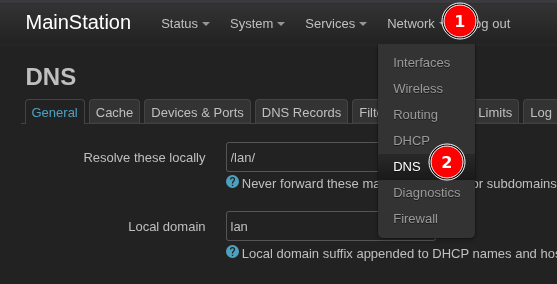
In openWRT navigate into
Network –> DNS –> Filter and add your domain to the domain whitelist.
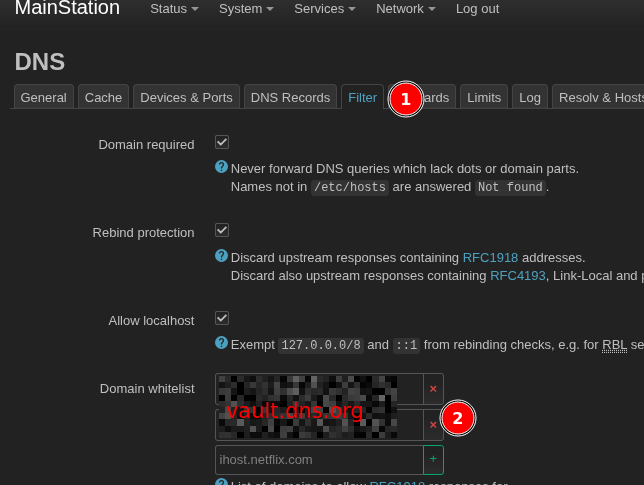 That's it. Now your local only DNS gets a trusted certificate and you can access vaultwarden without exposing it to the internet.
If this will be the final solution? Who knows. But if I find another way, I will post it as well.